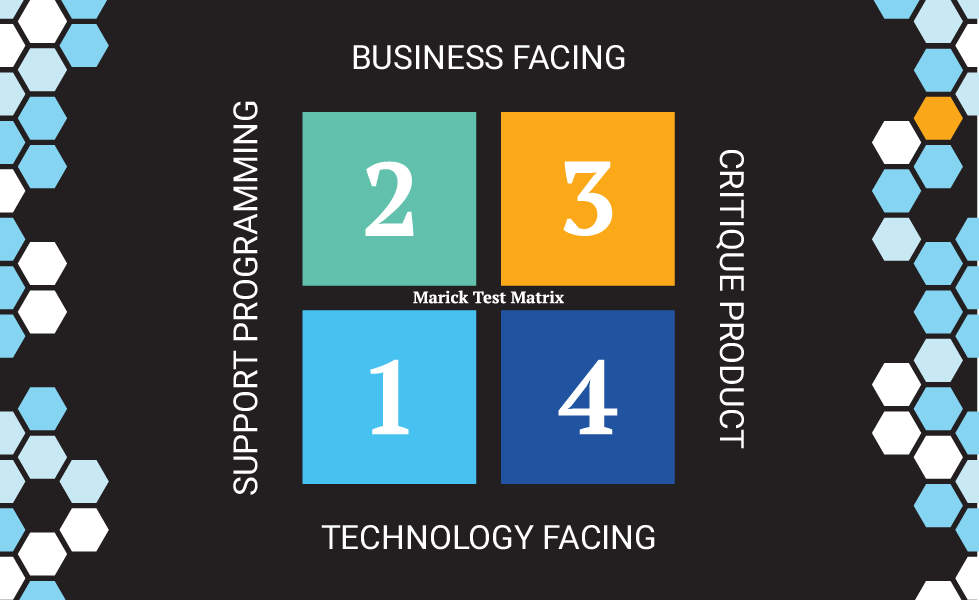
Quadrant 3: Discovering the Unexpected with Exploratory Testing and AI
Because specifications are always incomplete, Quadrant 3 exploratory testing is where teams discover the unexpected problems. AI now makes that discovery continuous and comprehensive.
TABLE OF CONTENTS
- Introduction, A Comprehensive Testing Strategy: Part 3
- Understanding Quadrant 3: Business-Facing, Critiquing the Product
- The Types of Quadrant 3 Testing
- Applying the Essential Perspectives to Quadrant 3
- The Challenge: Exploratory Testing Doesn't Scale
- How Testaify Changes Everything
- Structuring Effective Manual Exploratory Testing
- Common Pitfalls to Avoid
- Conclusion
Introduction, A Comprehensive Testing Strategy: Part 3
In Parts 1 and 2, we covered the tests that support development—Quadrant 2's acceptance tests and Quadrant 1's unit and integration tests. These verify that the software meets the specifications and that the code is well-structured.
But here's an uncomfortable truth I've learned over my career: specifications lie. Not intentionally—they're just incomplete. Requirements documents don't capture every edge case. User stories don't anticipate every way users will interact with the system. And automated tests, no matter how comprehensive, only find the problems you've thought to look for.
I've watched teams with 95% code coverage and thousands of automated tests ship software riddled with issues. Why? Because they forgot about Quadrant 3: Business-Facing Tests that Critique the Product.
Understanding Quadrant 3: Business-Facing, Critiquing the Product
Quadrant 3 is fundamentally different from Quadrants 1 and 2. These tests don't verify specifications—they question whether we built the right thing at all. They were primarily manual, requiring human judgment and creativity. They're exploratory, with testers designing and executing tests simultaneously, adapting based on discoveries. Today, with the emergence of AI tools like Testaify, you can take your quadrant 3 testing to whole new heights.
A well-known saying from testing says: "Automation finds known problems. Exploratory testing finds unknown problems." The teams that understood this built better software. The teams that didn't? They learned from production incidents.
These tests answer questions automation can't: Does this actually solve the user's problem? Is it usable? What did we forget to specify? What breaks when users do unexpected things?
The Types of Quadrant 3 Testing
Exploratory testing is a simultaneous process of learning, test design, and execution. It's not ad-hoc testing—it's skilled investigation. I've worked with exploratory testers who could find issues in an hour that automated tests would never catch. If you add Testaify to your toolbox, you can explore further than any human tester ever could.
Usability testing evaluates whether users can actually accomplish their goals. I've seen perfectly functional software that users hated because nobody tested whether it was actually usable. Features that technically work but frustrate users might as well be broken.
User Acceptance Testing (UAT) brings in real users who discover the issues teams miss. The best UAT I've seen involves actual customers testing in realistic scenarios. The worst is when teams use UAT as a checkbox exercise with no real user involvement.
Applying the Essential Perspectives to Quadrant 3
The four Essential Perspectives guide exploratory testing by helping testers know where to look and what questions to ask.
1. Functional Perspective
In Quadrant 3, the Functional perspective asks: "Does the system actually do what users need in real-world scenarios?"
Quadrant 2 tested against specifications. Quadrant 3 tests reality. I've seen this repeatedly: specifications say one thing, users need another, and exploratory testing finds the gap.
Real discoveries look like this: Order totals are incorrect when multiple discount codes are applied (even though each works individually). The system accepts future birth dates. Users can add the same item with different options, creating chaos at checkout.
These aren't spec violations—they're missing specs. Automation won't find them because nobody wrote a test for them.
2. Performance Perspective
The Performance perspective asks: "How does the system actually feel to use?"
Not "What's the 95th percentile response time under 10,000 concurrent users?"—that's Quadrant 4. Quadrant 3 is about perceived performance during everyday use.
I worked on a system once where search results were technically returned in under 2 seconds. But it felt slow because nothing appeared on screen until all the results loaded. Exploratory testing caught that. Automated tests didn't work because they measured technical response time rather than user experience.
Common discoveries: search that feels sluggish, uploads with no progress feedback, mobile apps that freeze when backgrounded, dashboards that load unnecessary data, and everything slows down.
3. Security Perspective
The Security perspective asks: "Does the system actually protect user data in real-world use?"
Exploratory testers find functional security flaws that automation misses. Sequential user IDs in URLs. Error messages revealing registered emails. Password reset tokens that never expire. Sensitive data in browser autocomplete.
I've found critical authorization bugs just by clicking around and trying to access things I shouldn't. No fancy penetration testing tools needed—just curiosity and knowing what to look for.
4. Usability Perspective
The Usability perspective is central to Quadrant 3: "Can real users accomplish their goals?"
Users are clicking non-clickable elements that appear to be buttons. Errors appear far from the problem field. Mobile keyboards hide inputs. Color-only indicators are meaningless to colorblind users.
I once watched a usability test in which every participant struggled with the same form field. The automated tests all passed. The code was perfect. The design was "intuitive." But real users couldn't use it. That's why Quadrant 3 matters.
The Challenge: Exploratory Testing Doesn't Scale
Here's the problem I've wrestled with my entire career: exploratory testing is invaluable, but it's time-consuming and doesn't scale.
A skilled tester might thoroughly explore 3-5 workflows, test 20-30 pages, and execute 100-200 interactions during a sprint. That's valuable work. But it leaves vast areas untested. I've managed teams where we simply couldn't afford enough exploratory testing to cover everything that mattered.
This gap haunted software testing for decades, until now.
How Testaify Changes Everything
At Testaify, our goal is to deliver Continuous Comprehensive Testing, and Quadrant 3 has been the bottleneck for years. Traditional test automation can't do exploratory testing. Manual testing doesn't scale. We needed something different.
Testaify provides AI-powered autonomous testing that dramatically increases Quadrant 3 coverage. Unlike traditional automation that follows predetermined scripts, Testaify's AI autonomously explores applications, discovering pages, features, and interactions—including areas teams never prioritize for manual testing.
What excites me most about Testaify is how it systematically applies testing techniques to explore the application under test. It tests input combinations, validates business rules, and discovers edge cases that manual testers might not think to try. It's tireless in exploring variations.
And it can run continuously. Not during sprint testing cycles—continuously. Issues get caught immediately with every new build.
Testaify doesn't replace skilled exploratory testing. It amplifies it. Your QA team focuses on complex workflows that require human judgment, while Testaify provides comprehensive coverage everywhere else.
Structuring Effective Manual Exploratory Testing
Even with Testaify, manual exploratory testing remains essential. Here's how I structure it:
Time-box sessions: 60-90 minutes with clear charters. "Explore checkout from a mobile user's perspective."
Use testing heuristics: Test boundaries (Goldilocks). Verify CRUD operations. Check consistency. Follow data through the system.
Apply all four perspectives: For each session, explicitly consider functional bugs, performance issues, security gaps, and usability problems.
Document effectively: What you tested, what you observed, reproduction steps, and which perspective matters.
Common Pitfalls to Avoid
Don't do scripted "exploratory" testing. That's just manual test case execution with a fancy name.
Don't squeeze exploratory testing into gaps—schedule dedicated sessions. Use Testaify for continuous coverage.
Don't focus only on happy paths. Test unlikely scenarios—Testaify excels here.
Don't dismiss usability issues. Every struggle is an opportunity to improve.
Conclusion
Quadrant 3 testing discovers what automation misses. By applying the four Essential Perspectives—Functional, Performance, Security, and Usability—you ensure a comprehensive evaluation of user experience.
Testaify dramatically amplifies Quadrant 3 by autonomously exploring applications and testing continuously. Testaify makes Continuous Comprehensive Testing achievable—not a pipedream, but a practical reality.
This is why we built Testaify. The testing problem has frustrated me for decades. We finally have a solution that works.
In the final article, I'll cover Quadrant 4—the rigorous non-functional testing that validates performance at scale, comprehensive security, and reliability.
Next in this series: Part 4 - Ensuring Quality Attributes with Non-Functional Testing (Quadrant 4)
About Testaify: Testaify provides AI-powered autonomous testing that dramatically expands test coverage, particularly in Quadrant 3 exploratory testing. Discover how Testaify achieves Continuous Comprehensive Testing at www.testaify.com.
About the Author
 Testaify founder and COO Rafael E. Santos is a Stevie Award winner whose decades-long career includes strategic technology and product leadership roles. Rafael's goal for Testaify is to deliver comprehensive testing through Testaify's AI-first platform, which will change testing forever. Before Testaify, Rafael held executive positions at organizations like Ultimate Software and Trimble eBuilder.
Take the Next Step
Testaify is in managed roll-out. Request more information to see when you can bring Testaify into your testing process.